
Among the easiest ways to enhance performance is the upgrade of the RAM of your laptop. Nevertheless, when you recently went shopping, you must have come across a puzzling question: 32GB of DDR4 or 16GB of DDR5?
One provides you with more memory. The other is newer and faster technology. But which one do you find to be more important in your day-to-day life?
In this blog, we will break it down, nothing complicated, just comparisons to specs and data, so that you could make the right choice, depending on your needs and budget.
First of all, Understanding the Basics.
We would begin by explaining what is meant by DDR4 and DDR5.
DDR is a short form of Double Data Rate and the figure that comes after it (4 or 5) is the generation. The new generations are more efficient in power, faster and have more bandwidth.
An easy analogy is as follows:
Imagine RAM as a table on which you work. Capacity (GB) is the size of the desk – the number of files you can spread simultaneously. Speed (MHz) is the speed at which your hands can move on that desk.
Then the main question arises Do you need a bigger desk (32GB DDR4) or a smaller desk with faster hands (16GB DDR5)?
The Products We Compare.
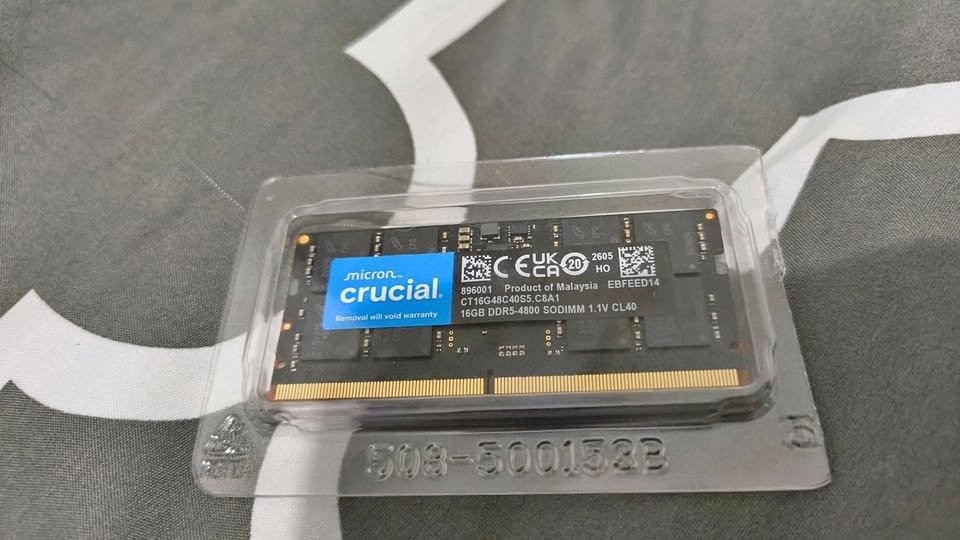
In order to make this comparison, we are considering two particular, commonly available Crucial RAM modules:
| Feature | Crucial 32GB DDR4 (CT32G4SFD832A) | Crucial 16GB DDR5 (CT16G48C40S5) |
| Capacity | 32GB | 16GB |
| Generation | DDR4 | DDR5 |
| Speed | 3200 MHz | 4800 MHz |
| CAS Latency | CL22 | CL40 |
| Voltage | 1.2V | 1.1V |
| Pin Count | 260-pin | 262-pin |
| Form Factor | SO-DIMM | SO-DIMM |
| Price (approx.) | ₹27,599 | ₹20,299 |
Both are SO-DIMM modules, which are laptop-compatible and both are non-ECC. But more than that they are very different. Let’s explore how.
1. Raw Speed: DDR5 Takes the Lead
The most obvious advantage of DDR5 is clock speed.
- DDR4 3200 MHz provides a theoretical peak bandwidth of approximately 25.6 GB/s.
- DDR5 4800 MHz extends that to about 38.4 GB/s (and that is why its PC speed is PC5-38400).
That is almost a 50 percent increase in raw memory bandwidth.
Practically, this implies that DDR5 is capable of feeding your processor much faster, which is important to:
Video editing and rendering.
- High-setting gaming.
- Execution of machine learning models.
- Multitasking with challenging applications.
2. Capacity: DDR4 Doubles the Memory
This is where the 32GB DDR4 module retaliates- hard.
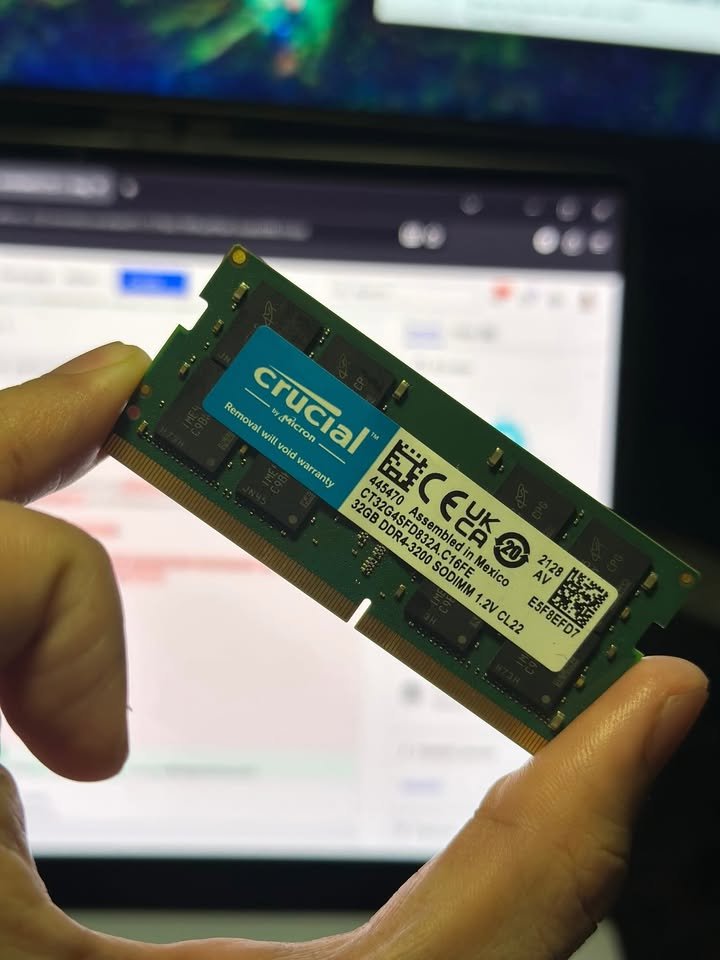
16GB is adequate to the majority of users nowadays. But 32GB provides you with breathing space, particularly when you:

- Have 30+ browser tabs open when using Slack, Spotify, and an IDE.
- Process big data in Excel or data analysis software.
- Run virtual machines
- Edit high-resolution images or 4K video projects.
- Run creative programs such as Adobe After Effects or DaVinci Resolve, which consume a lot of memory.
The current operating systems, browsers, and applications are getting more and more memory-intensive. With moderate use, chrome can easily eat up 4-8GB of memory on its own. When your system has exhausted its physical RAM, it begins to use your SSD as virtual memory (so-called paging), which is much slower, even with high-speed NVMe drives.
Winner: DDR4 (32GB)
3. Latency: The Hidden Factor
It is an important one that is often neglected.
CAS Latency (CL) is the time between the request by the memory controller and the actual delivery of the data by the RAM. The smaller the CL number, the smaller the delay.
- Crucial DDR4 3200 MHz → CL22
- Crucial DDR5 4800 MHz → CL40
On the surface, CL40 is hideous in comparison with CL22. However, latency does not only depend on the CL number, but also on the clock speed.
True latency formula:
Real Latency (in nanoseconds) = (CL ÷ Clock Speed in MHz) × 2000
Let’s calculate:
- DDR4: (22 ÷ 3200) × 2000 = 13.75 ns
- DDR5: (40 ÷ 4800) × 2000 = 16.67 ns
In fact, So DDR5 4800 MHz is slightly slower in latency (by about 21 percent) than DDR4 3200 MHz. This may manifest as slightly worse performance in tasks that are sensitive to latency such as gaming where frame times and responsiveness are important.
The latency difference in productivity workloads is usually offset by the high bandwidth of DDR5, though.
Winner: DDR4 (32GB) — by a small margin
4. Power Efficiency: DDR5 Consumes less power.
Battery life is important to the laptop users.
- DDR4 works at 1.2V.
- DDR5 works with 1.1V.
That is about 8 percent of voltage drop. This will not necessarily extend your battery life, but it will make the system overall cooler and more efficient, particularly when combined with 12th Gen Intel Core processors and beyond which are explicitly designed to support DDR5.
That little efficiency improvement multiplies over an entire workday. DDR5 also has on-die ECC (error correction) that enhances stability and data integrity, even in non-ECC consumer modules. This is not provided by DDR4.
Winner: DDR5 (16GB)
5. Compatibility: They’re NOT Interchangeable
This is vital (no pun intended) and most buyers do not pay much attention to it:
DDR4 and DDR5 are physically incompatible and electrically incompatible.
- DDR4 SO-DIMMs have 260 pins
- DDR5 SO-DIMMs have 262 pins
The key (notch) on the module is at a different position. DDR5 RAM cannot be installed in a DDR4 laptop slot and vice versa. The motherboard of your laptop supports either or neither.
Before you even consider performance, make sure you know what generation of laptop you have. You can:
Before you even consider performance, make sure you know what generation of laptop you have. You can:
- Check the model of your laptop on the site of a manufacturer.
- Install a free utility such as the System Scanner of Crucial.
- Test your laptop manual or BIOS specifications.
Verdict: It is not a choice, it is a hardware limitation. Get what your laptop can support.
6. Future-Proofing: DDR5 The Future.
DDR5 was introduced in 2020 and is immature. That means:
- DDR5 speed will keep increasing (5600 MHz, 6400 MHz and higher are already offered in newer modules)
- DDR5 prices are falling consistently.
- All new Intel (13th/14th Gen) and AMD (Ryzen 7000+) laptop platforms are transitioning solely to DDR5.
When purchasing a new laptop, it is likely to have DDR5. In the case of an older laptop upgrade, it is nearly certain that it uses DDR4.
Winner: DDR5 (16GB) — for longevity
7. Price-to-Performance: DDR4 Offers More Value Today
Now, what are you paying per GB:
- Crucial 32GB DDR4: ₹27,599 ÷ 32 = ~₹862 per GB
- Crucial 16GB DDR5: ₹20,299 ÷ 16 = ~₹1,269 per GB
The DDR4 is approximately 32 percent less expensive per GB. And you are receiving twice the capacity.
When you are budget conscious and your laptop has DDR4, the 32GB module provides much more usable memory at a lower cost per gigabyte.
But when your laptop supports only DDR5, this comparison is irrelevant, you must purchase DDR5.
Winner: DDR4 (32GB)
Which Should YOU Choose?
Let us pair each option with real-life use cases:
Select 32GB DDR4 When You:
- Have a laptop with DDR4 (pre-12th Gen Intel or older AMD) compatibility.
- A heavy multitasker (dozens of tabs, multiple apps, virtual machines)?
- Do video editing, 3D rendering, or data analysis in which large files remain in memory.
- Prefer the most affordable prices.
- Do not intend to purchase a new laptop within 1-2 years.
Select 16GB DDR5 When You:
- compatible (13th Gen Intel or later)
- Is a gamer or runs software that is more bandwidth than capacity Have a laptop that is DDR5-
- intensive.
- Moderate multitasking (16GB should be sufficient to most general users)
- Desire increased battery life and power efficiency.
- Do you want to build something that you can keep future-proof?
Key Specs at a Glance (Quick Comparison Table)
| Spec | Crucial 32GB DDR4 | Crucial 16GB DDR5 |
| Capacity | 32GB | 16GB |
| Speed | 3200 MHz | 4800 MHz |
| Bandwidth | ~25.6 GB/s | ~38.4 GB/s |
| CAS Latency | CL22 | CL40 |
| True Latency | ~13.75 ns | ~16.67 ns |
| Voltage | 1.2V | 1.1V |
| Pins | 260 | 262 |
| On-die ECC | No | Yes |
| Price | ₹27,599 | ₹20,299 |
| Cost per GB | ~₹862 | ~₹1,269 |
Final Verdict
No one option is better than the other here, it is all a matter of your laptop, your workload, and your budget.
When your laptop has DDR4, Crucial 32GB DDR4 3200 MHz (CT32G4SFD832A) at 27,599 is a great investment. You receive a huge 32GB of high-quality, low-latency memory that will take any multitasking or creative load you can put on it.
If your laptop uses DDR5, the Crucial 16GB DDR5 4800 MHz (CT16G48C40S5) at ₹20,299 is a solid choice. You are receiving higher bandwidth, more power saving, and a module designed to support the new generation of processors. Even with most users, students, professionals, average gamers 16GB remains more than sufficient.